स्टोरेज सफ़ाई
देखना मुफ़्त, बदलने के लिए Pro
ऐसे कैश और बचा सामान ढूँढता है जिसे आप सुरक्षित रूप से हटा सकते हैं, दिखाता है कि हर एक क्या है, और जो आप चुनें उसे ट्रैश में भेजता है।
The problem
Your disk is filling up and you do not know why. The usual suspects are caches that apps rebuild anyway, build data from Xcode, old simulators, installers forgotten in Downloads, and leftovers from apps you deleted long ago.
Tools that delete first and explain later are how people lose files. Hedroom works the other way round: it explains each category, leaves your own files unticked, sends everything to the Trash, and asks you each time.
How it works
- Scan. Hedroom walks the folders where caches, build data and leftovers live and counts what each would really free. It changes nothing; the summary says "nothing changed yet". It needs no admin password and no Full Disk Access.
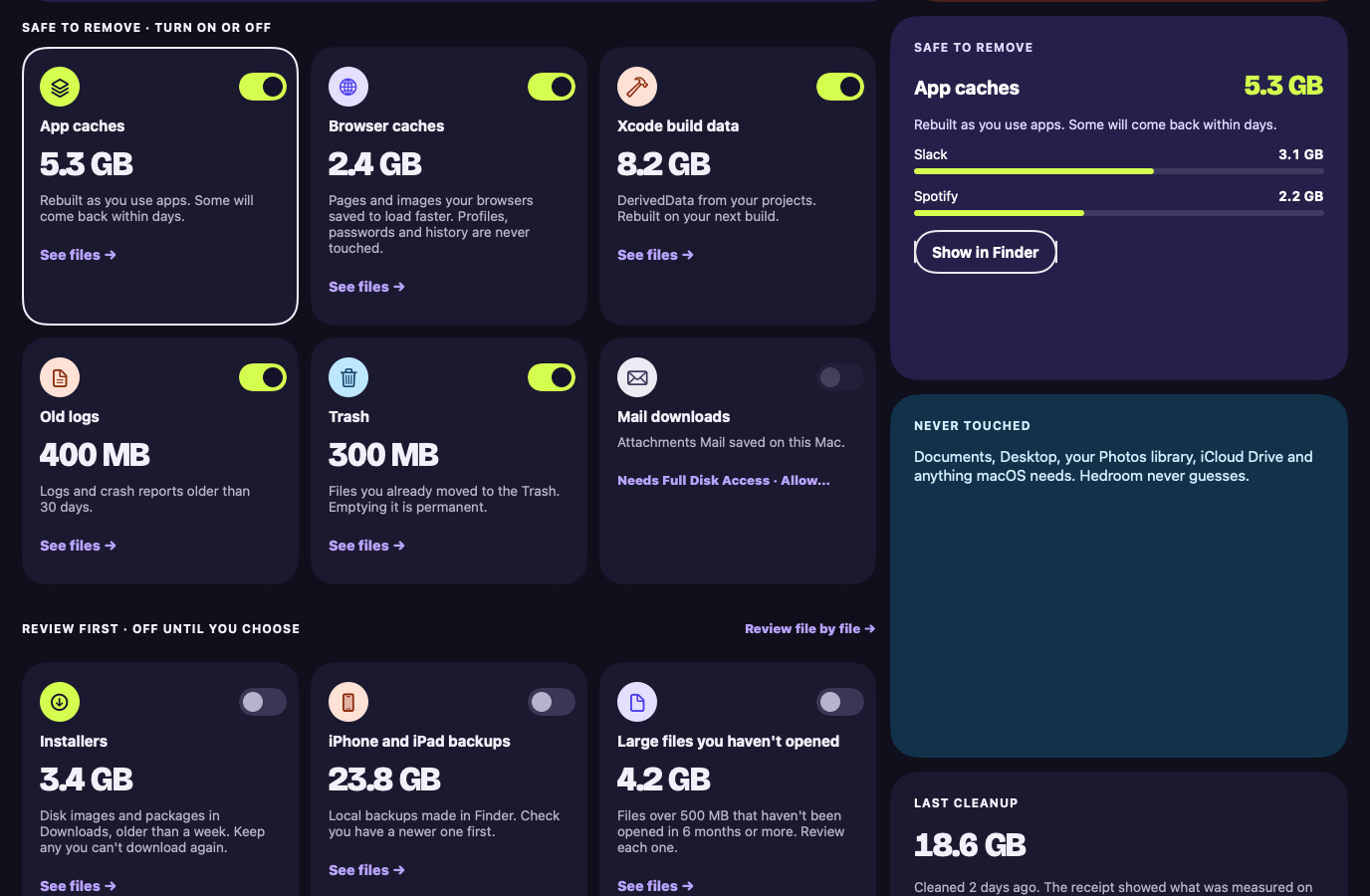
- Sort. "Safe to remove" is what apps rebuild or left behind. "Review first" is your own files, such as installers, large files you have not opened in months and old downloads. Those are off, and not even looked at until you turn them on.
- Choose. Open any category to see its files, tick or untick them, and press Space for Quick Look. Press Clean up and a confirmation lists exactly what will move.
- Check again, then move. Right before moving each item, Hedroom confirms it is still the same file, still in an allowed folder, and not open in an app. Then it goes to the Trash.
- Receipt and Put back. The receipt says what went to the Trash. Space counts as freed only once the Trash is emptied, which is a separate confirmation covering only what Hedroom moved. Put back restores the items.
What you will see
Storage opens with your disk (for example "Macintosh HD"), a "Free after cleanup" number beside what is free now, and a bar of used, selected and free space. Two groups follow: Safe to remove, with a short explanation of each category, and Review first. Rows that need Full Disk Access say so, with a button to allow it.
When an app that owns a category is running, a warning row appears: "Xcode is open. Build data it's using right now will be skipped unless you quit Xcode first." Its Quit Xcode button uses the normal, graceful quit.
A worked example
Example, not real data
Build data with Xcode still open
Say the scan finds 18 GB across caches, Xcode build data and leftovers from two apps you deleted. You press Clean up, and the confirmation lists every item.
Xcode is open, so build data it touched in the last 10 minutes is skipped, and Hedroom says so. The rest goes to the Trash. The receipt reports what moved and offers "Empty these from the Trash". Free space grows only if you empty them, and some caches will return as apps rebuild them, which is normal. If you change your mind first, Put back returns each item to where it was.
Details and limits
यह क्या करता है
- कैश, बिल्ड के बचे सामान और ऐसी ही फ़ाइलों को स्कैन करता है, हर श्रेणी की आसान व्याख्या के साथ।
- आपकी अपनी फ़ाइलें पहले समीक्षा के लिए दिखाता है, चेकबॉक्स और क्विक लुक के साथ, और उन्हें बिना चुने छोड़ता है।
- जो फ़ाइलें किसी ऐप में खुली हैं उन्हें छोड़ देता है, और "वापस रखें" सूची रखता है।
What it will not do
- हर बार आपकी स्पष्ट अनुमति के बिना आपकी फ़ाइलें हटाना। सफ़ाई फ़ाइलों को ट्रैश में भेजती है। उन्हें हमेशा के लिए हटाने के लिए हर बार अलग पुष्टि चाहिए, और नियम या दूसरी स्वचालित कार्रवाइयाँ कभी फ़ाइलें नहीं हटा सकतीं।
- सेटअप के दौरान पूर्ण डिस्क ऐक्सेस माँगना।
Limits
- फ़ाइलों को ट्रैश में भेजने से तब तक कुछ खाली नहीं होता जब तक ट्रैश खाली न हो। रसीद सिर्फ़ उन आइटम को खाली करने की पेशकश करती है जिन्हें Hedroom ने भेजा था, आपकी पुष्टि के बाद।
- iPhone और iPad बैकअप और Mail डाउनलोड के लिए पूर्ण डिस्क ऐक्सेस चाहिए। इसके बिना वे पंक्तियाँ यही कहती हैं और बाकी सब काम करता है।
मुफ़्त या Pro
स्कैन मुफ़्त है। सफ़ाई Pro का हिस्सा है।
A scan changes nothing, so it is free. Cleaning up changes your disk, so it is Pro.
Questions people ask
Does Hedroom delete my files?
Not without your permission each time. Cleanup moves files to the Trash. Removing them for good is a separate confirmation every time, covers only items Hedroom moved, and rules or other automatic actions can never do it. There is no "don't ask again".
Is it safe to remove caches?
Caches are files apps rebuild when they need them, so nothing of yours is lost. Some will come back as apps rebuild them, so part of the space returns. The receipt says so.
Could it touch my photos, iCloud Drive or Mail?
No. Hedroom refuses a fixed list of places, including system folders, iCloud Drive, the Photos library, Mail (apart from Mail downloads you choose), Messages and any .git folder. It also skips iCloud files that are not downloaded to your Mac.
What if it moves something I need?
Open the cleanup's receipt and press Put back. Items return to where they were. If something new now sits there, they go to a Hedroom Restored folder in Downloads, and nothing is overwritten.