영수증
보기는 무료, 변경은 Pro
실행 전 측정값, 실행 후 측정값, 그리고 모든 동작에 대한 정직한 판정 하나.
The problem
After you fix something on your Mac, you are left to guess whether it helped, or whether the Mac would have settled on its own. Taking someone's word for it is not proof.
A receipt answers that for every action Hedroom takes. It compares readings from before with readings from after, and gives one of a few honest verdicts, including "No measurable effect." when the numbers did not move.
How it works
- Before. Hedroom takes the median of the 5 minutes of readings before the action. With less than 2 minutes of data, the receipt's confidence drops to low.
- Settle. It skips 30 seconds (60 after a relaunch) while the app reloads and things settle.
- After. It measures for 5 minutes and stops there if the readings are stable, or keeps going up to 15 minutes if they are not.
- Compare. A change counts only if it clears a floor: 100 MB of memory, 10 percentage points of one CPU core, 0.3 W, or 50 MB of disk. If the before readings were noisy, the change must also be larger than three times that noise.
- Say it honestly. The verdict is Measured, No effect, Not measurable (other apps changed too much at the same time) or Cancelled. Confidence is high, medium or low. A low one is labelled rough and left out of totals.
What you will see
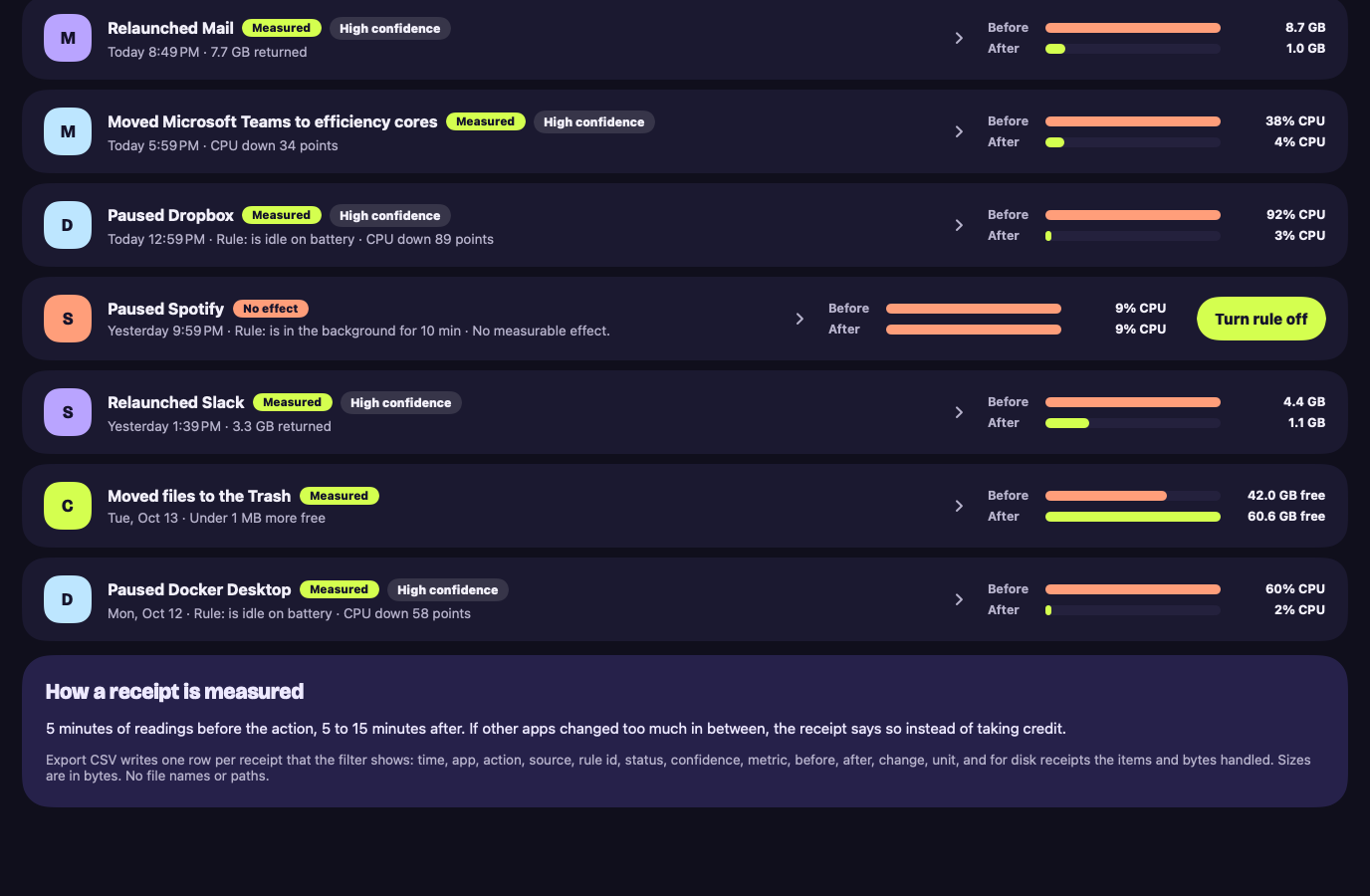
The Receipts screen opens with a headline such as "21.3 GB of memory given back, every number measured on this Mac", with chips for fixes, rule actions, disk freed and rules not helping. Below is the list: each row names the action, shows Measured or No effect and a confidence label, and draws before and after bars. Open one for a chart of the measured value with the two windows shaded, the numbers, the confidence and anything that got in the way.
A cleanup receipt shows Put back while the files are still in the Trash. A rule with three no-effect receipts in a row gets a Turn rule off button. Export CSV writes one row per receipt with numbers only, no paths and no file names.
A worked example
Example, not real data
A rule that is not helping
Say you made a rule that pauses Spotify when it has been in the background for 10 minutes. It runs three times. Each receipt compares Spotify's CPU before and after: about 9% of a core both times. That is less than the 10 points Hedroom counts, so each one reads "No measurable effect."
After the third, Hedroom flags the rule: "Pausing Spotify saved nothing in 3 tries. Turn the rule off?" You decide; the rule never turns itself off. Had other apps moved by more than 1 GB in the same minutes, the receipts would have said Not measurable instead, and stayed out of your totals.
Details and limits
하는 일
- 동작 전 약 5분의 측정값과 동작 후 5~15분의 측정값을 비교합니다.
- 수치가 움직였을 때는 "측정됨", 움직이지 않았을 때는 "측정할 수 있는 효과가 없습니다.", 다른 앱의 변화가 너무 커서 판단할 수 없을 때는 "측정 불가"라고 표시합니다.
- 정리의 경우 휴지통으로 옮긴 항목을 보고합니다. 디스크 공간이 확보된 것으로 집계하는 것은 휴지통을 비운 뒤뿐입니다.
What it will not do
- 측정할 수 없는 변화를 성과로 내세우는 일.
- 파일이 아직 휴지통에 있는데 디스크 공간을 확보했다고 주장하는 일.
Limits
- 영수증은 두 시간 구간을 비교하는 것입니다. 통제된 실험이 아닙니다.
- 실제로 작은 변화가 있어도 "측정할 수 있는 효과가 없습니다"라고 표시될 수 있습니다. Hedroom은 보여 줄 수 없는 성과를 내세우느니 작은 성과를 놓치는 쪽을 택합니다.
무료 또는 Pro
지난 영수증은 무료에서도 계속 읽을 수 있습니다. 새 영수증은 동작에 딸려 생기므로 Pro와 함께 제공됩니다.
The line is simple: looking at your Mac is free, and acting on it, with the measurement of what the action did, is Pro.
Questions people ask
Is a receipt scientific proof?
No, and it says so. It compares two time windows on your Mac. It is not a controlled trial. Something else you do during a window can show up in the numbers, which is what the Not measurable verdict is for.
Why would I see "No measurable effect" often?
Hedroom prefers to miss a small win than to claim one it cannot show, so a real change smaller than the floors above reads as no effect. It costs you nothing: no credit taken and no total inflated. How to read a receipt explains each part.
Are receipts stored or sent anywhere?
They are stored on your Mac. Receipt rows hold numbers and counts, never file paths. Nothing is uploaded.
Does a disk cleanup count as freed space straight away?
No. Moving files to the Trash frees nothing until the Trash is emptied. The cleanup receipt reports what went to the Trash, and claims free space only when it measurably grew.