동의를 받은 뒤에 하는 조치
Pro
앱 다시 실행, 고효율 코어로 이동, 일시 정지. 한 번에 하나씩, 먼저 설명한 뒤에 합니다.
The problem
You have found the app that is hogging memory or CPU, and now you have to deal with it. Quitting by hand means finding the right app and losing your place. Force Quit is a blunt tool. And afterwards nothing tells you whether it helped.
Fixes are three small actions, each explained before you press the button and each reversible: relaunch the app, move it to the efficiency cores, or pause it. Every one goes through a safety gate that refuses when the app might be doing something you would not want interrupted.
How it works
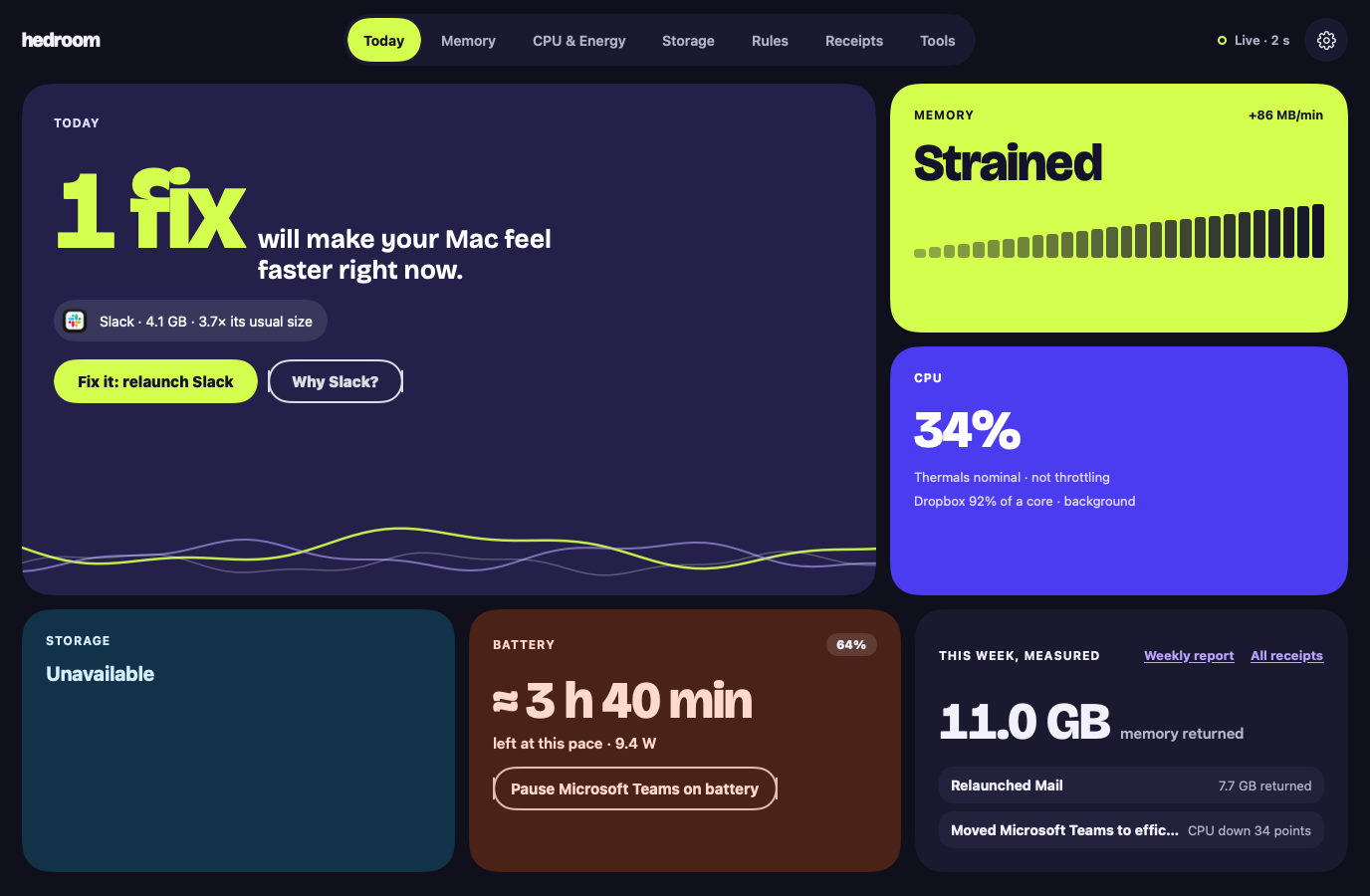
- See the reason. A fix is offered only for a finding, with the app's name and numbers, such as "Slack · 4.1 GB · 3.7× its usual size".
- Press the button. For a relaunch, a sheet says what is kept, using a line from the process library (for Slack, that your messages live on Slack's servers), and lists the steps.
- Pass the safety gate. Hedroom checks that the app is not Apple's, not on your never-touch list, not on a call or playing audio, not a backup app mid-backup, and more. A refusal shows as a sentence with its reason, never as an error.
- Act gently. Relaunch asks the app to quit, as ⌘Q does, and waits up to 20 seconds. If the app is showing a save dialog, Hedroom stops and asks you to switch to it. Efficiency cores lowers the app's priority. Pause freezes it.
- Measure. Hedroom reopens the app, watches for 5 minutes and writes a receipt.
What you will see
On Today, the hero tile shows the app and one button, such as "Fix it: relaunch Slack", with a "Why Slack?" link. The relaunch sheet walks through the steps: ask Slack to quit like ⌘Q, wait up to 20 seconds, open it again, measure for 5 minutes. A checkbox offers to turn the fix into a rule for next time; you choose.
On a background app's row, Normal, Efficiency cores and Pause are three pills you can switch at any time. A paused app shows a Paused badge in Hedroom and in the menu bar panel, with Resume all one click away. If an app does not quit, Hedroom says so: "Slack is still open. It may be showing a dialog asking you to save." There is a Switch to Slack button, and a separate, red Force quit.
A worked example
Example, not real data
Dropbox burns CPU on battery
Say Dropbox has averaged over 80% of one core in the background for 12 minutes while you work on battery. Today shows it, and a notification offers to move it to the efficiency cores, the gentlest option. Pause is offered only after 15 minutes.
You press Efficiency cores. Dropbox keeps syncing, at lower priority, and you can switch it back to Normal whenever you like. Five minutes later the receipt compares Dropbox's CPU before and after. If it fell by at least 10 percentage points of a core, the receipt says Measured. If it did not, it says "No measurable effect." and takes no credit.
Details and limits
하는 일
- 다시 실행: ⌘Q처럼 앱에 종료를 요청한 뒤 다시 엽니다.
- 고효율 코어: 앱의 우선순위를 낮춰 지금 하는 작업과 경쟁하지 않게 합니다.
- 일시 정지: 그 앱으로 돌아올 때까지, 길어도 60분 동안 앱을 멈춰 둡니다.
What it will not do
- Apple이 서명한 것을 일시 정지하거나 우선순위를 낮추거나 종료하는 일. 예외는 Xcode처럼 직접 사용하는 Apple 앱이며, 클릭 한 번으로 다시 실행하거나 종료할 수 있습니다.
- 지금 앞에 있는 앱, 통화 중인 앱, 오디오를 재생 중이거나 마이크 또는 카메라를 사용 중인 앱, 백업이 실행되는 동안의 백업 앱을 건드리는 일.
- 건드리지 않는 목록에 있는 앱을 건드리는 일.
- 아무것도 몰래 종료하는 일. 강제 종료에는 별도로 두 번째 확인이 필요합니다.
Limits
- Hedroom은 앱에 저장하지 않은 작업이 있는지 확실하게 알 수 없습니다. 그래서 사용자가 직접 앱을 고른 경우가 아니면, 일시 정지에 대응하는 것으로 확인된 앱만 일시 정지합니다.
- 앱이 통화 중이거나 백업 중인지 Hedroom이 확인할 수 없으면, 클릭일 때는 먼저 묻고 규칙일 때는 아무것도 하지 않습니다.
- Hedroom이 종료되면 일시 정지한 앱이 바로 재개됩니다. 충돌한 경우에는 Hedroom이 없어진 것을 알아챈 작은 감시 프로세스가 재개하며, 어떤 경우든 60분 안에 재개됩니다.
무료 또는 Pro
Pro 기능입니다. 7일 무료 체험에 모두 포함됩니다. Pro가 없으면 조치를 클릭했을 때 "조치는 Pro 기능입니다" 시트가 대신 열립니다.
Reading your Mac is free. Acting on it, and measuring what the action did, is what Pro covers. Without Pro you still see the fix and its explanation.
Questions people ask
Can a relaunch lose my work?
Hedroom asks the app to quit exactly as ⌘Q does, so an app with unsaved changes shows its own save dialog and Hedroom waits, up to 20 seconds, without forcing anything. It cannot see unsaved work, because that would need Accessibility access, which it does not ask for. So the process library records what each known app keeps, and Hedroom will not pause an app from a rule unless the library marks it safe or you picked it.
Does it need admin rights?
No. Relaunch, efficiency cores and pause act on apps you run, as you, with no helper.
How do I undo a pause or an efficiency-cores move?
Switch to the app: a paused app resumes the moment you activate it, and by default an app returns to normal priority when it comes to the front. You can also press Normal or Resume on its row, or Resume all in the menu bar.
Can it touch macOS or other Apple processes?
No. Anything signed by Apple or in a system folder is explain-only. The one exception is an Apple app you use yourself, such as Xcode or Pages, which you can relaunch or quit with a click and which rules never touch.