Løsninger, med dit samtykke
Pro
Genstart en app, flyt den til effektivitetskerner, eller sæt den på pause. Ét trin ad gangen, hvert forklaret først.
The problem
You have found the app that is hogging memory or CPU, and now you have to deal with it. Quitting by hand means finding the right app and losing your place. Force Quit is a blunt tool. And afterwards nothing tells you whether it helped.
Fixes are three small actions, each explained before you press the button and each reversible: relaunch the app, move it to the efficiency cores, or pause it. Every one goes through a safety gate that refuses when the app might be doing something you would not want interrupted.
How it works
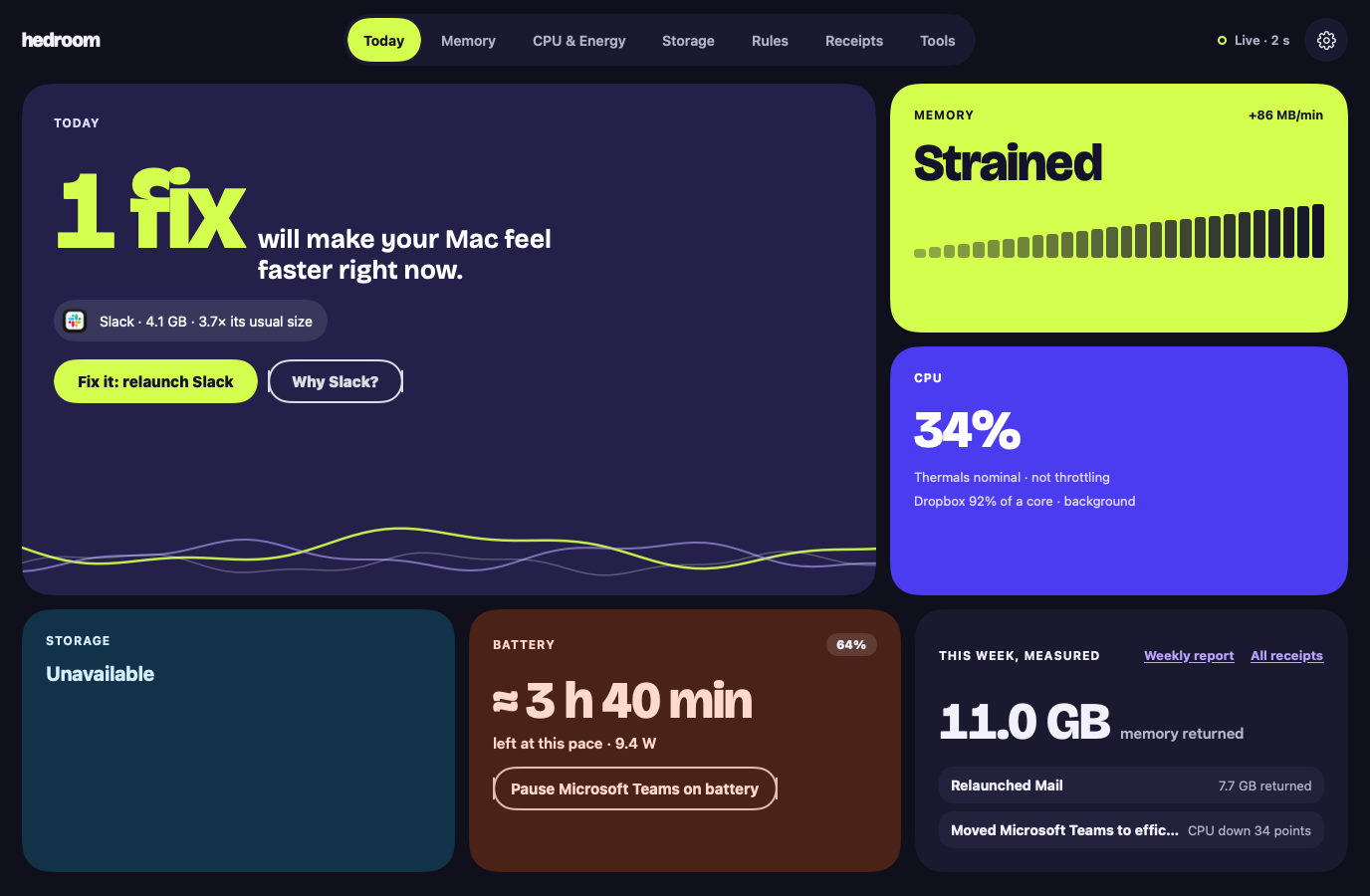
- See the reason. A fix is offered only for a finding, with the app's name and numbers, such as "Slack · 4.1 GB · 3.7× its usual size".
- Press the button. For a relaunch, a sheet says what is kept, using a line from the process library (for Slack, that your messages live on Slack's servers), and lists the steps.
- Pass the safety gate. Hedroom checks that the app is not Apple's, not on your never-touch list, not on a call or playing audio, not a backup app mid-backup, and more. A refusal shows as a sentence with its reason, never as an error.
- Act gently. Relaunch asks the app to quit, as ⌘Q does, and waits up to 20 seconds. If the app is showing a save dialog, Hedroom stops and asks you to switch to it. Efficiency cores lowers the app's priority. Pause freezes it.
- Measure. Hedroom reopens the app, watches for 5 minutes and writes a receipt.
What you will see
On Today, the hero tile shows the app and one button, such as "Fix it: relaunch Slack", with a "Why Slack?" link. The relaunch sheet walks through the steps: ask Slack to quit like ⌘Q, wait up to 20 seconds, open it again, measure for 5 minutes. A checkbox offers to turn the fix into a rule for next time; you choose.
On a background app's row, Normal, Efficiency cores and Pause are three pills you can switch at any time. A paused app shows a Paused badge in Hedroom and in the menu bar panel, with Resume all one click away. If an app does not quit, Hedroom says so: "Slack is still open. It may be showing a dialog asking you to save." There is a Switch to Slack button, and a separate, red Force quit.
A worked example
Example, not real data
Dropbox burns CPU on battery
Say Dropbox has averaged over 80% of one core in the background for 12 minutes while you work on battery. Today shows it, and a notification offers to move it to the efficiency cores, the gentlest option. Pause is offered only after 15 minutes.
You press Efficiency cores. Dropbox keeps syncing, at lower priority, and you can switch it back to Normal whenever you like. Five minutes later the receipt compares Dropbox's CPU before and after. If it fell by at least 10 percentage points of a core, the receipt says Measured. If it did not, it says "No measurable effect." and takes no credit.
Details and limits
Hvad den gør
- Genstart: beder appen om at afslutte, ligesom ⌘Q gør, og åbner den derefter igen.
- Effektivitetskerner: sænker en apps prioritet, så den holder op med at konkurrere med det, du laver.
- Pause: fryser en app, indtil du skifter tilbage til den, eller i højst 60 minutter.
What it will not do
- Sætte noget signeret af Apple på pause, flytte det til effektivitetskerner eller afslutte det. Undtagelsen er en Apple-app, du selv bruger, som Xcode, som du kan genstarte eller afslutte med et klik.
- Røre den app, der er foran dig, en app i et opkald, en app der afspiller lyd eller bruger mikrofonen eller kameraet, eller en backup-app, mens en backup kører.
- Røre en app på din »rør aldrig«-liste.
- Afslutte noget i det stille. Tvungen lukning kræver en anden, separat bekræftelse.
Limits
- Hedroom kan ikke pålideligt afgøre, om en app har ugemt arbejde, så den sætter kun apps på pause, som vides at kunne håndtere det, medmindre du selv vælger appen.
- Hvis Hedroom ikke kan tjekke, om en app er i et opkald eller tager backup, spørger et klik dig først, og en regel gør ingenting.
- Hvis Hedroom lukker, genoptages apps på pause med det samme. Hvis den går ned, genoptager en lille vagtproces dem, når den opdager, at Hedroom er væk, og under alle omstændigheder inden for 60 minutter.
Gratis eller Pro
Del af Pro. Alt er inkluderet i den 7 dages gratis prøveperiode. Uden Pro åbner et klik på en løsning i stedet et ark med »Løsninger er en del af Pro«.
Reading your Mac is free. Acting on it, and measuring what the action did, is what Pro covers. Without Pro you still see the fix and its explanation.
Questions people ask
Can a relaunch lose my work?
Hedroom asks the app to quit exactly as ⌘Q does, so an app with unsaved changes shows its own save dialog and Hedroom waits, up to 20 seconds, without forcing anything. It cannot see unsaved work, because that would need Accessibility access, which it does not ask for. So the process library records what each known app keeps, and Hedroom will not pause an app from a rule unless the library marks it safe or you picked it.
Does it need admin rights?
No. Relaunch, efficiency cores and pause act on apps you run, as you, with no helper.
How do I undo a pause or an efficiency-cores move?
Switch to the app: a paused app resumes the moment you activate it, and by default an app returns to normal priority when it comes to the front. You can also press Normal or Resume on its row, or Resume all in the menu bar.
Can it touch macOS or other Apple processes?
No. Anything signed by Apple or in a system folder is explain-only. The one exception is an Apple app you use yourself, such as Xcode or Pages, which you can relaunch or quit with a click and which rules never touch.