修復,需要你的同意
Pro
重新開啟一個 App,把它移到高效率核心,或者暫停它。一次一步,每一步都會先解釋。
The problem
You have found the app that is hogging memory or CPU, and now you have to deal with it. Quitting by hand means finding the right app and losing your place. Force Quit is a blunt tool. And afterwards nothing tells you whether it helped.
Fixes are three small actions, each explained before you press the button and each reversible: relaunch the app, move it to the efficiency cores, or pause it. Every one goes through a safety gate that refuses when the app might be doing something you would not want interrupted.
How it works
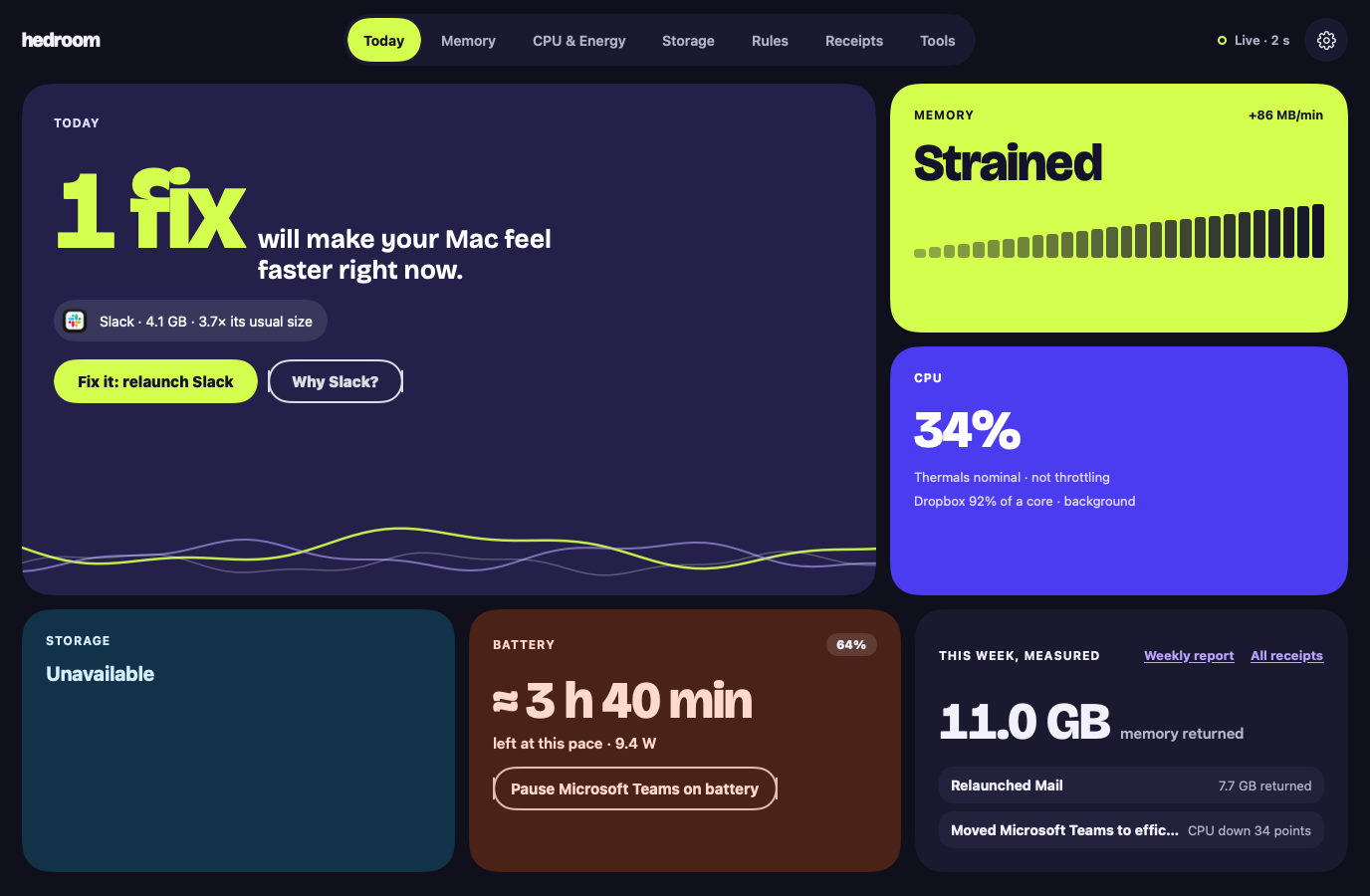
- See the reason. A fix is offered only for a finding, with the app's name and numbers, such as "Slack · 4.1 GB · 3.7× its usual size".
- Press the button. For a relaunch, a sheet says what is kept, using a line from the process library (for Slack, that your messages live on Slack's servers), and lists the steps.
- Pass the safety gate. Hedroom checks that the app is not Apple's, not on your never-touch list, not on a call or playing audio, not a backup app mid-backup, and more. A refusal shows as a sentence with its reason, never as an error.
- Act gently. Relaunch asks the app to quit, as ⌘Q does, and waits up to 20 seconds. If the app is showing a save dialog, Hedroom stops and asks you to switch to it. Efficiency cores lowers the app's priority. Pause freezes it.
- Measure. Hedroom reopens the app, watches for 5 minutes and writes a receipt.
What you will see
On Today, the hero tile shows the app and one button, such as "Fix it: relaunch Slack", with a "Why Slack?" link. The relaunch sheet walks through the steps: ask Slack to quit like ⌘Q, wait up to 20 seconds, open it again, measure for 5 minutes. A checkbox offers to turn the fix into a rule for next time; you choose.
On a background app's row, Normal, Efficiency cores and Pause are three pills you can switch at any time. A paused app shows a Paused badge in Hedroom and in the menu bar panel, with Resume all one click away. If an app does not quit, Hedroom says so: "Slack is still open. It may be showing a dialog asking you to save." There is a Switch to Slack button, and a separate, red Force quit.
A worked example
Example, not real data
Dropbox burns CPU on battery
Say Dropbox has averaged over 80% of one core in the background for 12 minutes while you work on battery. Today shows it, and a notification offers to move it to the efficiency cores, the gentlest option. Pause is offered only after 15 minutes.
You press Efficiency cores. Dropbox keeps syncing, at lower priority, and you can switch it back to Normal whenever you like. Five minutes later the receipt compares Dropbox's CPU before and after. If it fell by at least 10 percentage points of a core, the receipt says Measured. If it did not, it says "No measurable effect." and takes no credit.
Details and limits
它做什麼
- 重新開啟:請 App 結束,就像按 ⌘Q 一樣,然後再次開啟它。
- 高效率核心:降低 App 的優先級,讓它不再與你正在做的事爭搶資源。
- 暫停:凍結 App,直到你切換回它,或最長 60 分鐘。
What it will not do
- 暫停、降級或結束任何由 Apple 簽名的內容。例外是你自己使用的 Apple App,例如 Xcode,你可以點一下就重新開啟或結束它。
- 觸碰你正在使用的 App、正在通話的 App、正在播放音訊或使用麥克風或相機的 App,或備份進行期間的備份 App。
- 觸碰你「從不觸碰」名單上的 App。
- 悄悄結束任何東西。強制結束需要另一次單獨的確認。
Limits
- Hedroom 無法可靠地判斷某個 App 是否有未儲存的工作,所以除非你自己選擇該 App,否則它只會暫停已知可以安全暫停的 App。
- 如果 Hedroom 無法確認某個 App 是否正在通話或備份,按一下操作會先詢問你,規則則什麼都不做。
- 如果 Hedroom 結束,已暫停的 App 會立刻恢復。如果它當機,一個小型常駐程式會在發現 Hedroom 已不在時讓它們恢復,無論如何最遲 60 分鐘內恢復。
免費還是 Pro
屬於 Pro。7 天免費試用中包含全部內容。沒有 Pro 時,按一下某項修復會開啟「修復屬於 Pro」的面板。
Reading your Mac is free. Acting on it, and measuring what the action did, is what Pro covers. Without Pro you still see the fix and its explanation.
Questions people ask
Can a relaunch lose my work?
Hedroom asks the app to quit exactly as ⌘Q does, so an app with unsaved changes shows its own save dialog and Hedroom waits, up to 20 seconds, without forcing anything. It cannot see unsaved work, because that would need Accessibility access, which it does not ask for. So the process library records what each known app keeps, and Hedroom will not pause an app from a rule unless the library marks it safe or you picked it.
Does it need admin rights?
No. Relaunch, efficiency cores and pause act on apps you run, as you, with no helper.
How do I undo a pause or an efficiency-cores move?
Switch to the app: a paused app resumes the moment you activate it, and by default an app returns to normal priority when it comes to the front. You can also press Normal or Resume on its row, or Resume all in the menu bar.
Can it touch macOS or other Apple processes?
No. Anything signed by Apple or in a system folder is explain-only. The one exception is an Apple app you use yourself, such as Xcode or Pages, which you can relaunch or quit with a click and which rules never touch.