診斷
免費
Hedroom 讀取記憶體壓力、交換空間、CPU、散熱、電池和儲存空間,然後指出那個真正要緊的 App。
The problem
Your Mac feels slow, and Activity Monitor gives you numbers, not an answer. The memory bar is nearly full, which looks alarming, but a Mac that has been on for a while always shows most of its memory as used: macOS fills spare memory with cached files and hands it back the moment an app asks. Used memory on its own tells you very little.
What matters is whether macOS is struggling to find room, and whether one app has grown far past its normal size. Spotting that by eye means watching several graphs for an hour. Diagnosis does the watching, names the one app that matters, or says plainly that nothing needs you.
How it works
- Read. One sampler reads memory pressure, swap growth, CPU, thermals, battery and free storage. It checks every 2 seconds while a Hedroom window or the menu bar panel is open, and less often in the background.
- Judge memory by pressure. The state is Healthy, Strained or Critical, from macOS's own pressure level and how fast swap is growing. Swap that merely exists never makes your Mac Strained. Swap that keeps growing can.
- Learn what is normal. For each app, Hedroom learns a usual size from your last 7 days. Until it has watched an app for about 6 hours, it says it is still learning and uses typical sizes for apps it knows by name.
- Wait to be sure. An app is flagged as leaking only when it is at least 3 times its usual size, at least 1 GB (or 6% of your RAM, if that is larger), and has stayed that way for 20 minutes or keeps growing. A background app that averages 80% of one core for 3 minutes is flagged as runaway CPU.
- Say it once. The finding appears on Today with its reason. Notifications are rationed: the same finding about the same app at most once every 6 hours, and no more than 3 non-urgent ones a day.
What you will see
Today shows one thing: a single suggested fix with its reason, such as an app's name, its size and how many times its usual size that is, or "All good. Nothing needs you right now." The Memory screen adds the pressure gauge, a 60-minute timeline of Healthy, Strained and Critical, the swap rate, what is filling your memory (apps, wired and GPU, compressed, cached files), and every app sorted by size.
The menu bar icon shows the same state, with a small dot when a fix is ready. Apple's own processes get a plain-words explanation and no buttons.
A worked example
Example, not real data
Slack grows over an afternoon
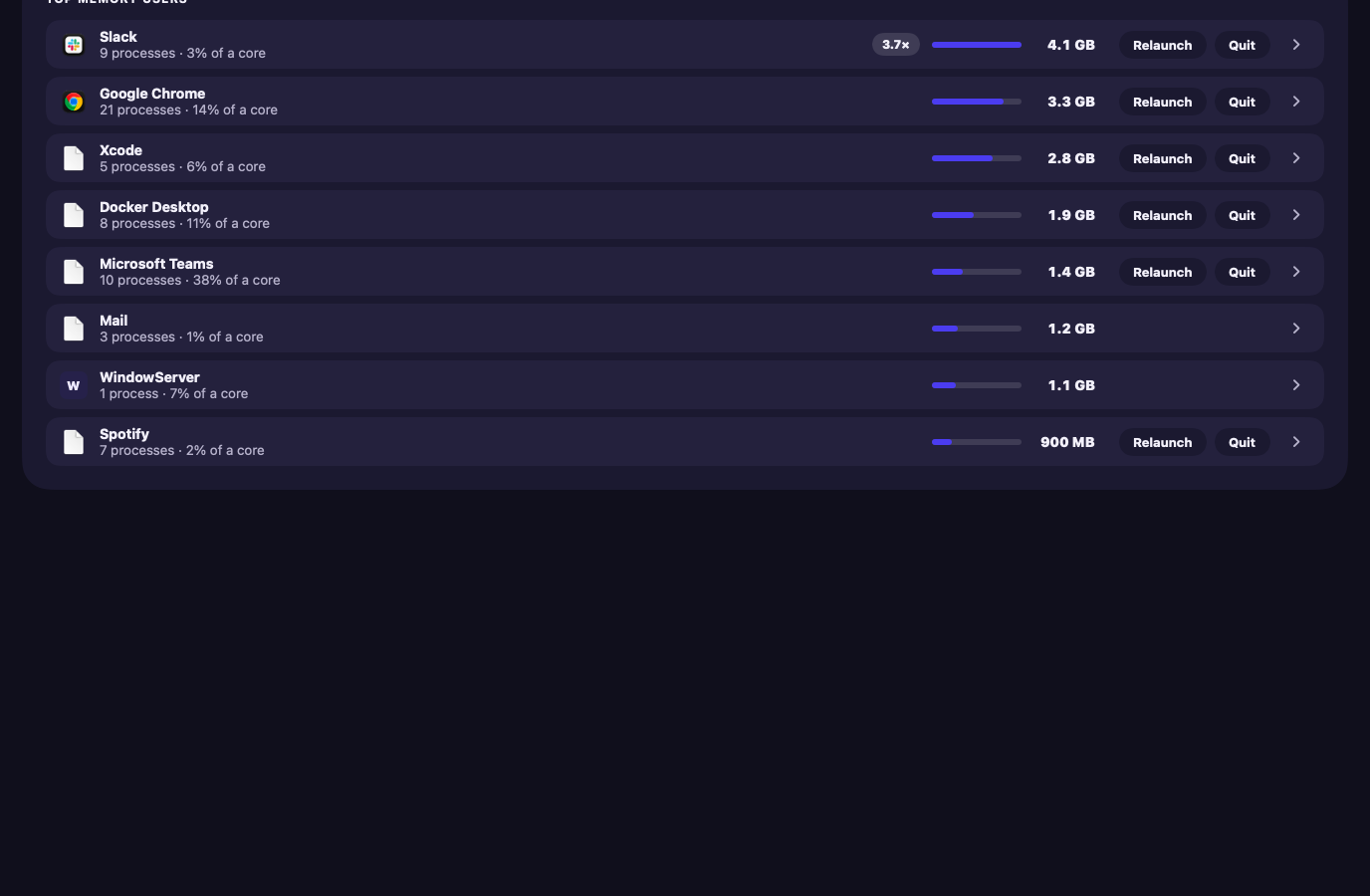
Say Slack usually sits around 1.1 GB on your Mac. After a long call it reads 4.1 GB, which is 3.7 times its usual size, and it has stayed there for 20 minutes. Memory pressure has moved to Strained and swap keeps growing.
Today shows "Slack · 4.1 GB · 3.7× its usual size" and offers to relaunch it, with the reason. Nothing happens until you press the button; Fixes covers what the button does. If pressure had stayed Healthy, the same growth would still show on Today, but you would be notified only from 4 times its usual size.
Details and limits
它做什麼
- 根據記憶體壓力和交換空間增長的速度來判斷記憶體,而不是根據「已用記憶體」。
- 了解每個 App 在你的 Mac 上通常有多大,然後標出那個已增長到好幾倍並一直沒降下來的 App。
- 用平實的話解釋 macOS 自己的處理程序,例如 kernel_task 和 WindowServer。
- 在選單列顯示摘要,並就洩漏、失控的 CPU 和嚴重的記憶體壓力向你提醒。
What it will not do
- 顯示「問題」數量、嚇人的掃描結果,或未經測量的百分比。
- 僅僅因為查看,就對你的 Mac 做任何事。
Limits
- 只有當某個 App 異常大並持續一段時間(預設約 20 分鐘)後,才會標記為洩漏,所以短暫的峰值不算發現。
- 記憶體健康時,它會如實說明,然後保持安靜。這是正常狀態,而不是缺失。
免費還是 Pro
永久免費。
Reading your Mac changes nothing, so it stays free. Monitoring, explanations, alerts and the storage scan are free after the trial too.
Questions people ask
Does it need my admin password or Full Disk Access?
No. Setup asks for neither, and the readings behind Diagnosis need no admin rights. Full Disk Access is asked for only if you later turn on iPhone backups or Mail downloads in Storage.
Will watching my Mac slow it down?
Hedroom's budget is under 0.5% of one core on average and under 80 MB of memory. With no window open and 5-second ticks it measured 0.27% of one core on one MacBook Pro. That is one Mac, not a promise for yours. How it works has the measured figures and their limits.
Does anything leave my Mac?
No readings, app names or usage leave it. The only things that go online are the license check, update checks, a weekly download of the signed process library, and feedback you choose to send. Privacy lists each one.
What if it names the wrong app?
A finding is a suggestion. Nothing is done until you press a button, and you can put any app on your never-touch list, after which fixes and rules skip it. Alerts still show.