Oplossingen, met jouw toestemming
Pro
Open een app opnieuw, verplaats hem naar de efficiëntiekernen of pauzeer hem. Eén stap tegelijk, elk eerst uitgelegd.
The problem
You have found the app that is hogging memory or CPU, and now you have to deal with it. Quitting by hand means finding the right app and losing your place. Force Quit is a blunt tool. And afterwards nothing tells you whether it helped.
Fixes are three small actions, each explained before you press the button and each reversible: relaunch the app, move it to the efficiency cores, or pause it. Every one goes through a safety gate that refuses when the app might be doing something you would not want interrupted.
How it works
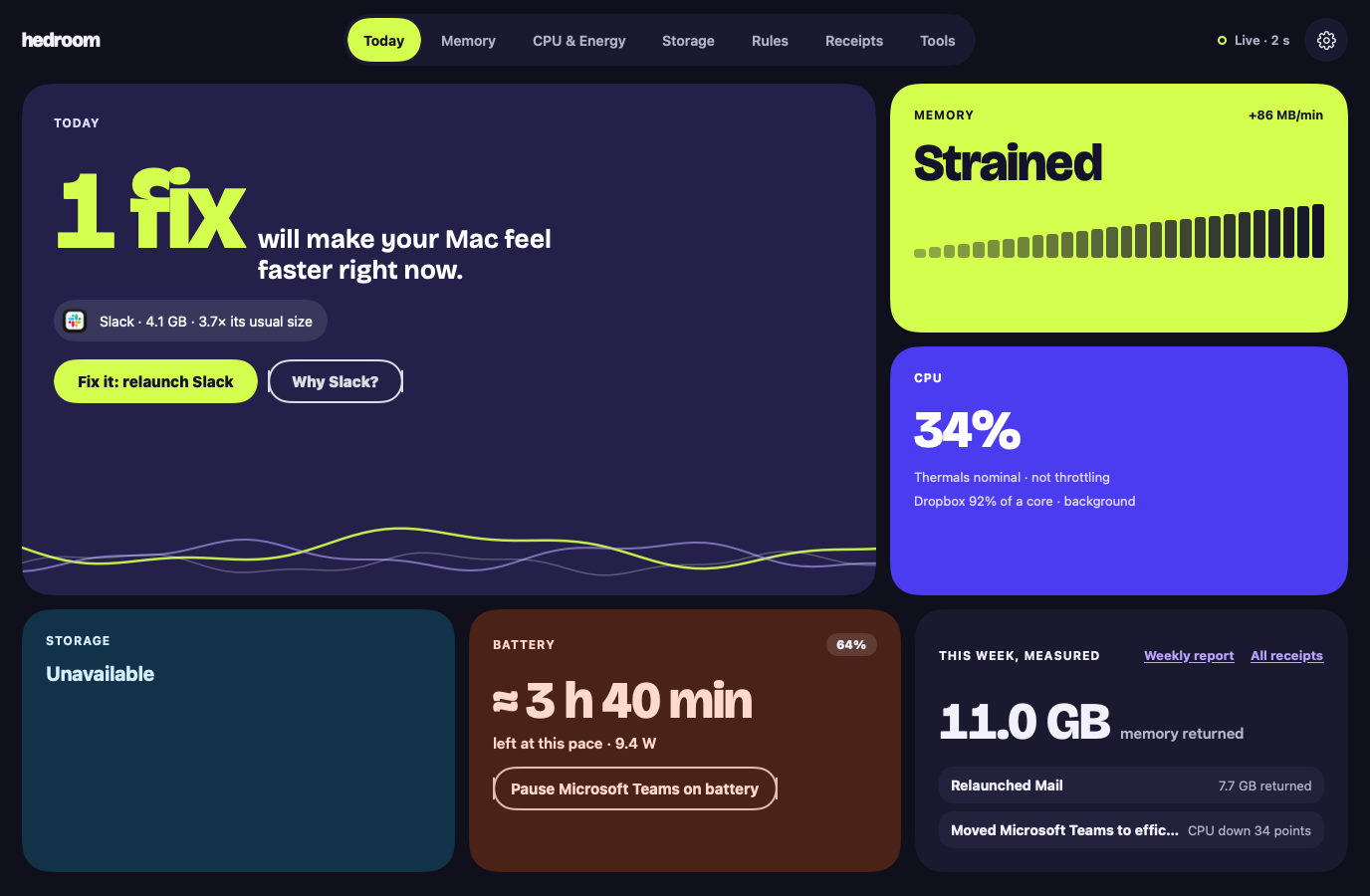
- See the reason. A fix is offered only for a finding, with the app's name and numbers, such as "Slack · 4.1 GB · 3.7× its usual size".
- Press the button. For a relaunch, a sheet says what is kept, using a line from the process library (for Slack, that your messages live on Slack's servers), and lists the steps.
- Pass the safety gate. Hedroom checks that the app is not Apple's, not on your never-touch list, not on a call or playing audio, not a backup app mid-backup, and more. A refusal shows as a sentence with its reason, never as an error.
- Act gently. Relaunch asks the app to quit, as ⌘Q does, and waits up to 20 seconds. If the app is showing a save dialog, Hedroom stops and asks you to switch to it. Efficiency cores lowers the app's priority. Pause freezes it.
- Measure. Hedroom reopens the app, watches for 5 minutes and writes a receipt.
What you will see
On Today, the hero tile shows the app and one button, such as "Fix it: relaunch Slack", with a "Why Slack?" link. The relaunch sheet walks through the steps: ask Slack to quit like ⌘Q, wait up to 20 seconds, open it again, measure for 5 minutes. A checkbox offers to turn the fix into a rule for next time; you choose.
On a background app's row, Normal, Efficiency cores and Pause are three pills you can switch at any time. A paused app shows a Paused badge in Hedroom and in the menu bar panel, with Resume all one click away. If an app does not quit, Hedroom says so: "Slack is still open. It may be showing a dialog asking you to save." There is a Switch to Slack button, and a separate, red Force quit.
A worked example
Example, not real data
Dropbox burns CPU on battery
Say Dropbox has averaged over 80% of one core in the background for 12 minutes while you work on battery. Today shows it, and a notification offers to move it to the efficiency cores, the gentlest option. Pause is offered only after 15 minutes.
You press Efficiency cores. Dropbox keeps syncing, at lower priority, and you can switch it back to Normal whenever you like. Five minutes later the receipt compares Dropbox's CPU before and after. If it fell by at least 10 percentage points of a core, the receipt says Measured. If it did not, it says "No measurable effect." and takes no credit.
Details and limits
Wat het doet
- Opnieuw openen: vraagt de app af te sluiten, zoals ⌘Q, en opent hem daarna opnieuw.
- Efficiëntiekernen: verlaagt de prioriteit van een app zodat hij niet meer concurreert met wat je doet.
- Pauzeren: bevriest een app tot je ernaar terugschakelt, of maximaal 60 minuten.
What it will not do
- Iets dat door Apple is ondertekend pauzeren, vertragen of afsluiten. De uitzondering is een Apple-app die je zelf gebruikt, zoals Xcode, die je met een klik opnieuw kunt openen of afsluiten.
- De app voor je neus aanraken, een app in gesprek, een app die geluid afspeelt of de microfoon of camera gebruikt, of een back-up-app terwijl een back-up loopt.
- Een app aanraken die op je lijst Nooit aanraken staat.
- Iets stilzwijgend afsluiten. Geforceerd afsluiten vraagt een tweede, aparte bevestiging.
Limits
- Hedroom kan niet betrouwbaar zien of een app niet-bewaard werk heeft, dus het pauzeert alleen apps waarvan bekend is dat ze dat aankunnen, tenzij je de app zelf kiest.
- Als Hedroom niet kan controleren of een app in gesprek is of een back-up maakt, vraagt een klik eerst om bevestiging en doet een regel niets.
- Als Hedroom stopt, worden gepauzeerde apps meteen hervat. Als het crasht, hervat een klein bewakingsproces ze wanneer het merkt dat Hedroom weg is, en in elk geval binnen 60 minuten.
Gratis of Pro
Onderdeel van Pro. Alles is inbegrepen in de gratis proefperiode van 7 dagen. Zonder Pro opent een klik op een oplossing in plaats daarvan het blad "Oplossingen zijn onderdeel van Pro".
Reading your Mac is free. Acting on it, and measuring what the action did, is what Pro covers. Without Pro you still see the fix and its explanation.
Questions people ask
Can a relaunch lose my work?
Hedroom asks the app to quit exactly as ⌘Q does, so an app with unsaved changes shows its own save dialog and Hedroom waits, up to 20 seconds, without forcing anything. It cannot see unsaved work, because that would need Accessibility access, which it does not ask for. So the process library records what each known app keeps, and Hedroom will not pause an app from a rule unless the library marks it safe or you picked it.
Does it need admin rights?
No. Relaunch, efficiency cores and pause act on apps you run, as you, with no helper.
How do I undo a pause or an efficiency-cores move?
Switch to the app: a paused app resumes the moment you activate it, and by default an app returns to normal priority when it comes to the front. You can also press Normal or Resume on its row, or Resume all in the menu bar.
Can it touch macOS or other Apple processes?
No. Anything signed by Apple or in a system folder is explain-only. The one exception is an Apple app you use yourself, such as Xcode or Pages, which you can relaunch or quit with a click and which rules never touch.