Correzioni, con il tuo consenso
Pro
Riaprire un'app, spostarla sui core di efficienza o metterla in pausa. Un passo alla volta, ognuno spiegato prima.
The problem
You have found the app that is hogging memory or CPU, and now you have to deal with it. Quitting by hand means finding the right app and losing your place. Force Quit is a blunt tool. And afterwards nothing tells you whether it helped.
Fixes are three small actions, each explained before you press the button and each reversible: relaunch the app, move it to the efficiency cores, or pause it. Every one goes through a safety gate that refuses when the app might be doing something you would not want interrupted.
How it works
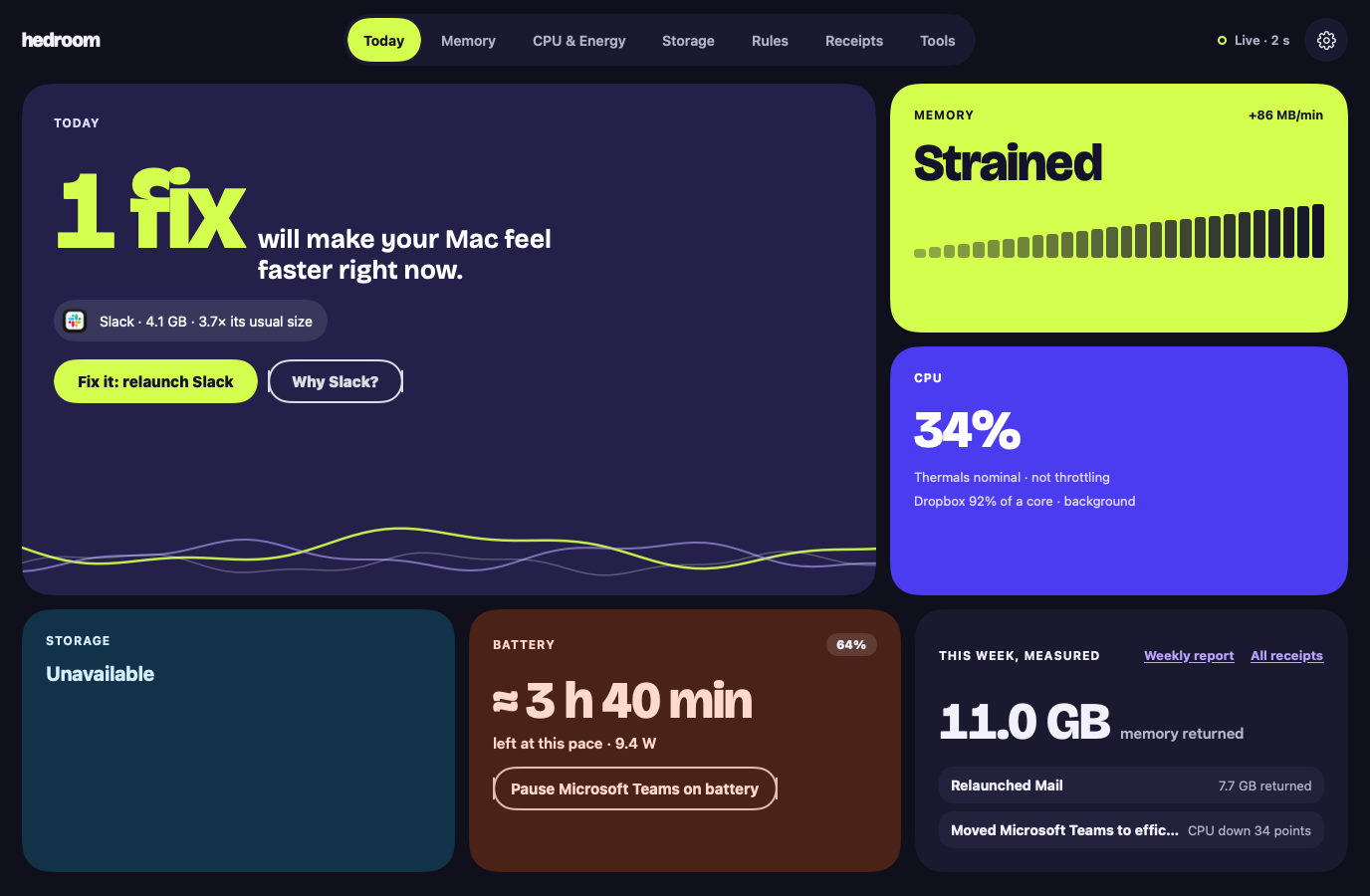
- See the reason. A fix is offered only for a finding, with the app's name and numbers, such as "Slack · 4.1 GB · 3.7× its usual size".
- Press the button. For a relaunch, a sheet says what is kept, using a line from the process library (for Slack, that your messages live on Slack's servers), and lists the steps.
- Pass the safety gate. Hedroom checks that the app is not Apple's, not on your never-touch list, not on a call or playing audio, not a backup app mid-backup, and more. A refusal shows as a sentence with its reason, never as an error.
- Act gently. Relaunch asks the app to quit, as ⌘Q does, and waits up to 20 seconds. If the app is showing a save dialog, Hedroom stops and asks you to switch to it. Efficiency cores lowers the app's priority. Pause freezes it.
- Measure. Hedroom reopens the app, watches for 5 minutes and writes a receipt.
What you will see
On Today, the hero tile shows the app and one button, such as "Fix it: relaunch Slack", with a "Why Slack?" link. The relaunch sheet walks through the steps: ask Slack to quit like ⌘Q, wait up to 20 seconds, open it again, measure for 5 minutes. A checkbox offers to turn the fix into a rule for next time; you choose.
On a background app's row, Normal, Efficiency cores and Pause are three pills you can switch at any time. A paused app shows a Paused badge in Hedroom and in the menu bar panel, with Resume all one click away. If an app does not quit, Hedroom says so: "Slack is still open. It may be showing a dialog asking you to save." There is a Switch to Slack button, and a separate, red Force quit.
A worked example
Example, not real data
Dropbox burns CPU on battery
Say Dropbox has averaged over 80% of one core in the background for 12 minutes while you work on battery. Today shows it, and a notification offers to move it to the efficiency cores, the gentlest option. Pause is offered only after 15 minutes.
You press Efficiency cores. Dropbox keeps syncing, at lower priority, and you can switch it back to Normal whenever you like. Five minutes later the receipt compares Dropbox's CPU before and after. If it fell by at least 10 percentage points of a core, the receipt says Measured. If it did not, it says "No measurable effect." and takes no credit.
Details and limits
Cosa fa
- Riapri: chiede all'app di chiudersi, come fa ⌘Q, poi la riapre.
- Core di efficienza: abbassa la priorità di un'app così che smetta di competere con ciò che stai facendo.
- Pausa: congela un'app finché non torni a essa, o per al massimo 60 minuti.
What it will not do
- Mettere in pausa, rallentare o chiudere qualsiasi cosa firmata da Apple. L'eccezione è un'app di Apple che usi tu, come Xcode, che puoi riaprire o chiudere con un clic.
- Toccare l'app che hai davanti, un'app in chiamata, un'app che riproduce audio o usa il microfono o la fotocamera, o un'app di backup mentre un backup è in corso.
- Toccare un'app del tuo elenco Non toccare mai.
- Chiudere qualcosa in silenzio. L'uscita forzata richiede una seconda conferma, separata.
Limits
- Hedroom non riesce a stabilire con certezza se un'app ha lavoro non salvato, quindi mette in pausa solo app note per gestirlo bene, a meno che tu non scelga l'app.
- Se Hedroom non riesce a verificare se un'app è in chiamata o sta eseguendo un backup, un clic chiede prima e una regola non fa nulla.
- Se Hedroom si chiude, le app in pausa riprendono subito. Se si blocca, un piccolo processo di protezione le fa riprendere quando si accorge che Hedroom non c'è più e, in ogni caso, entro 60 minuti.
Gratis o Pro
Fa parte di Pro. Tutto è incluso nella prova gratuita di 7 giorni. Senza Pro, un clic su una correzione apre un pannello “Le correzioni fanno parte di Pro”.
Reading your Mac is free. Acting on it, and measuring what the action did, is what Pro covers. Without Pro you still see the fix and its explanation.
Questions people ask
Can a relaunch lose my work?
Hedroom asks the app to quit exactly as ⌘Q does, so an app with unsaved changes shows its own save dialog and Hedroom waits, up to 20 seconds, without forcing anything. It cannot see unsaved work, because that would need Accessibility access, which it does not ask for. So the process library records what each known app keeps, and Hedroom will not pause an app from a rule unless the library marks it safe or you picked it.
Does it need admin rights?
No. Relaunch, efficiency cores and pause act on apps you run, as you, with no helper.
How do I undo a pause or an efficiency-cores move?
Switch to the app: a paused app resumes the moment you activate it, and by default an app returns to normal priority when it comes to the front. You can also press Normal or Resume on its row, or Resume all in the menu bar.
Can it touch macOS or other Apple processes?
No. Anything signed by Apple or in a system folder is explain-only. The one exception is an Apple app you use yourself, such as Xcode or Pages, which you can relaunch or quit with a click and which rules never touch.