規則
Pro
長期有效的指令,例如「電池供電下 Docker 閒置時,暫停它」,並經過與按一下操作相同的安全規則檢查。
The problem
Some problems come back every day. Dropbox starts working hard the moment you unplug, an updater wakes up in the middle of a meeting, Slack has grown again by Thursday. You can fix each one by hand every time, or tell Hedroom once.
A rule is a sentence: when this app is in this moment, do this. It is consent you give in advance, so it goes through the same safety checks as a click, uses only the gentlest actions without asking, and gets a receipt every time it acts.
How it works
- Build it in four steps. App, Moment, Action, Safety. The sentence updates as you choose, for example "When Dropbox uses lots of CPU in the background, move it to efficiency cores".
- Check the estimate. Hedroom replays your last 7 days and shows roughly how often the rule would have run, marked as an estimate. The real result appears in Receipts.
- Try it once. "Try it once now" runs the rule right now, so you see what it does before you rely on it.
- Hedroom watches. On every check it tests the condition. A rule fires when the condition turns true, not continuously, then waits out its cooldown (30 minutes by default). It does not pause, move or quit the app in front of you, an app on a call, or one on your never-touch list.
- It undoes itself. A move to the efficiency cores or a pause ends when the condition ends or when you switch to the app. Every action is logged and gets a receipt.
What you will see
The Rules screen lists each rule as a sentence with a switch, when it last ran and how many times this week. A rule set to ask first does not act on its own: it sends a notification with Do it and Skip. A rule flagged as not helping shows a Turn it off button. A "Never touch these" list sits below, with the note that anything playing audio or on a call is skipped too.
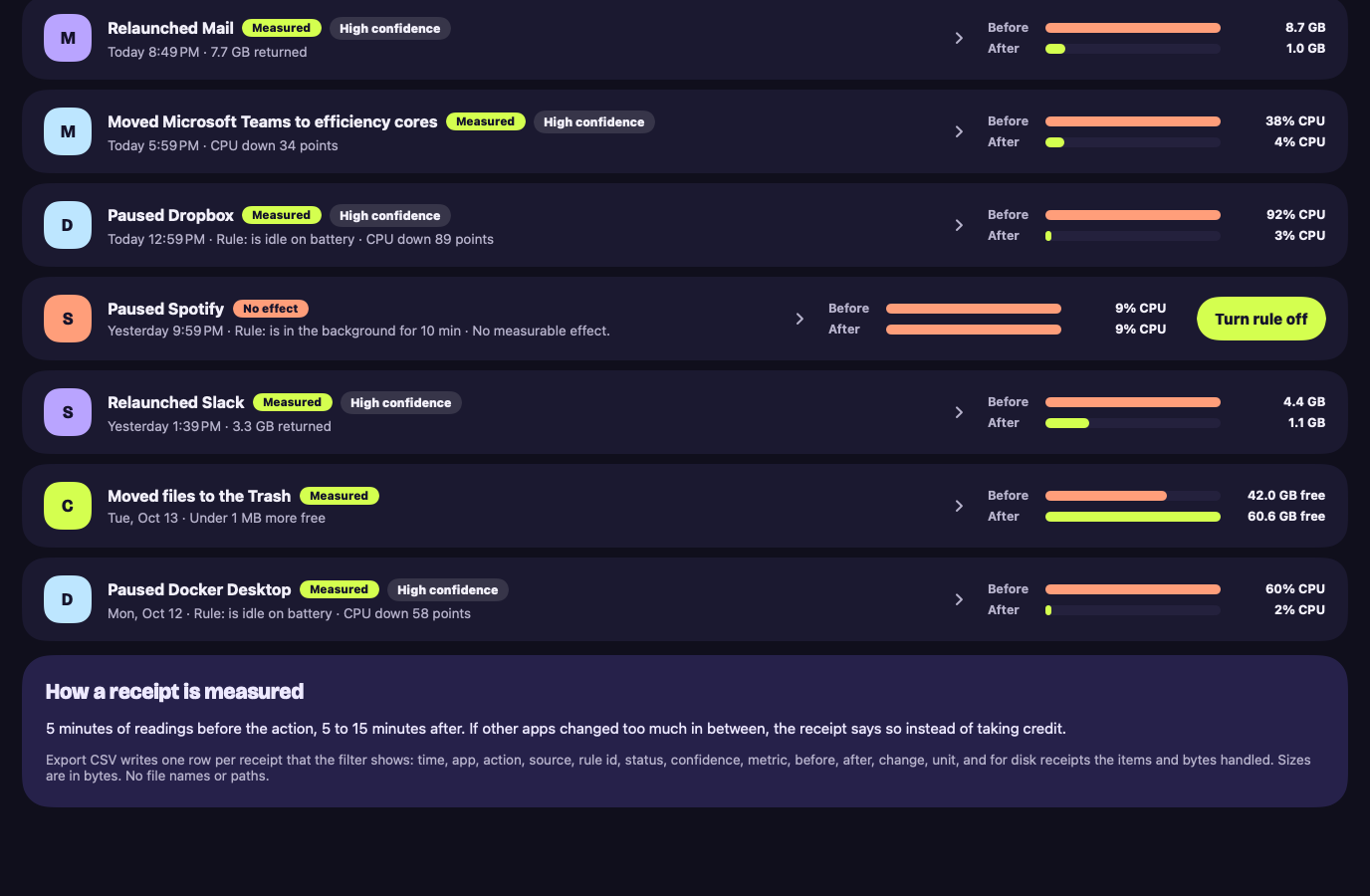
Every time a rule acts, Receipts gets a row that names it, for example "Rule: is idle on battery", with the measured before and after.
A worked example
Example, not real data
Taming a sync client
Say you use Dropbox, and your Mac gets warm at your desk every few days. You build: when Dropbox uses lots of CPU in the background, move it to the efficiency cores. The builder shows how often that would have happened last week, as an estimate.
You press Try it once now while Dropbox is busy. Hedroom runs the same safety checks as a click, moves Dropbox and writes a receipt. Happy with it, you save the rule. From then on it acts when Dropbox averages 80% of a core or more for 3 minutes in the background, and gives the app its normal priority back when the load ends or you open it. If three receipts in a row show no effect, Hedroom tells you.
Details and limits
它做什麼
- 分四步建置一條規則:App、時機、操作、安全。把規則顯示為一句話,並根據你最近 7 天給出一個估算。
- 讓你在依賴一條規則之前,先立即執行它一次。
- 在連續三份回執都沒有可測量的效果後,把這條規則標為「沒有幫助」。
What it will not do
- 自行開啟。每個範本出廠時都是關閉的,由你選擇啟用哪些。
- 略過安全檢查。規則要透過與按一下相同的檢查,並且由規則觸發的暫停只會作用於已知可以安全暫停的 App,或你自己選中的 App。
- 觸碰任何由 Apple 簽名的內容。
Limits
- Hedroom 最多保留 50 條規則。
免費還是 Pro
屬於 Pro。沒有 Pro 時,你的規則會保留但處於暫停狀態,並帶有「已暫停,Pro」的標記。
A rule acts for you, and acting is what Pro covers. Your rules are never deleted, only paused.
Questions people ask
Can a rule act without asking me?
Only a rule you created with ask first off, and only for the gentle actions: moving an app to the efficiency cores, pausing an app the library marks pause-safe or one you picked yourself, relaunching an app marked relaunch-safe, or sleeping browser tabs. A quit always asks first. Every template ships off.
Can a rule delete files?
No. A rule can relaunch, quit, pause or demote an app, sleep browser tabs, or notify you. Nothing automatic can delete anything.
What stops a rule from looping?
Limits: one rule action per app every 5 minutes, 20 an hour overall, 50 rules in total, and a cooldown after each run. If two rules want the same app, the gentler action wins.
Do rules run when Hedroom is closed?
No. Rules run inside Hedroom, which does its watching from the menu bar while the app is open. They stop while you pause monitoring.